Intercepting and modifying Fitbit Charge 5 messages
How I walked 1337 steps from the comfort of my chair
Introduction
During my second year of my Master’s degree, while I was at Eurecom, I worked on a semester project titled “IoT Security”. It was a 100-hour project whose objective was to understand the communication between a Fitbit Charge 5 (a wearable fitness tracker) and the Fitbit companion app. Decoding the communication required figuring out the messaging protocol between the device and the app, identifying when messages were sent, and analyzing their contents. Analyzing the communication between the device and the app is critical from a security perspective. Flaws in the implementation could allow a malicious actor within Bluetooth range to extract sensitive health data, such as heart rates and medical information, or even forcibly unpair the device and link it to their own phone. These threats are not just theoretical; one such example is the WhisperPair family of vulnerabilities, disclosed at the start of 2026.
The Fitbit device and the Fitbit app communicate via a framework called Golden Gate over Bluetooth Low Energy. In this post, I will detail what I learned about the framework, how I learned to use Frida to intercept and study all the messages sent between the two, and ultimately trick the Fitbit app into showing that I walked 1337 steps while sitting in front of my computer.
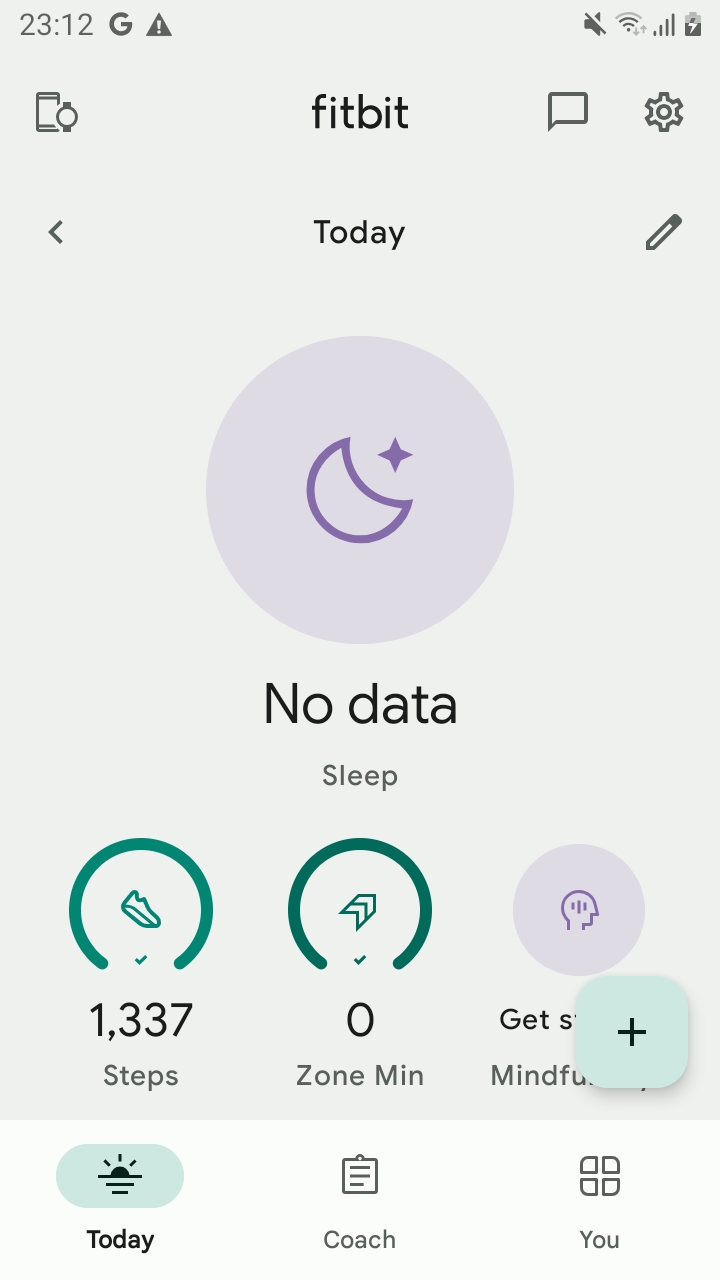 Tricked the Fitbit app to display that I walked 1337 steps!
My research on Golden Gate, the Fitbit app, and the Fitbit Charge 5 was done in late 2023 and early 2024, while the project was still in active development. At the time of writing, the GitHub repository is archived. This project was carried out under the supervision of Marco Casagrande. You can find more about his work on Android and Bluetooth on his Google Scholar page.
In this article, I will discuss the research done on:
- Fitbit Charge 5 Firmware: 57.20001.194.91
- Fitbit App: Fitbit_4.03.fitbit-mobile-40349031-576203982 (SHA256:
6e1c36e6135f8b28d3d29c46920f60c180e40765ca7cf26bda76cd773b9ae15f, Download Link)
What is Golden Gate
Golden Gate is a framework for connecting wearables and other IoT devices to mobile phones, tablets, and PCs using an IP-based protocol stack over Bluetooth Low Energy. In this article, I explain what Golden Gate is, where it is used, how it works, and what I learned about it.
The goal of the Golden Gate project is to allow implementers of embedded devices to communicate with remote (typically mobile) applications in a way that looks and feels like it would in a traditional networked environment, where the de facto standard is to use web technologies like TCP/IP for transport, TLS for security, HTTP for applications, and other familiar protocols.
Notably, the Golden Gate framework is what Fitbit devices use to handle the communication between the wearable and the device (e.g., Fitbit Charge 5) and the Fitbit Android app. In this article, I explain how I reverse engineered the functionality of the Fitbit app and how it uses the Golden Gate framework to communicate with Fitbit devices. Ultimately, to demonstrate my understanding of the communication, I will show how I was able to intercept and modify messages sent between the app and the device.
Stack diagram
The Golden Gate framework is what Fitbit devices use to handle the communication between the wearable (e.g., Fitbit Charge 5) and the Fitbit Android app.
To achieve this seamless integration, Golden Gate implements a core library that offers a complete network stack with cleanly separated layers. This architecture leverages well-established standards to bridge the gap between low-power hardware and modern web environments.
On top of the stack are the applications and services that make or receive requests. For application requests, the first supported protocol is CoAP. CoAP is a lightweight application protocol optimized for constrained devices. The requests traverse the network stack all the way to the bottom, where a physical transport layer is used to communicate with a remote peer application or service. On the peer is an equivalent stack that the requests traverse in the reverse direction, all the way to that peer’s own set of applications and services. The responses take the reverse route back to the original client application.
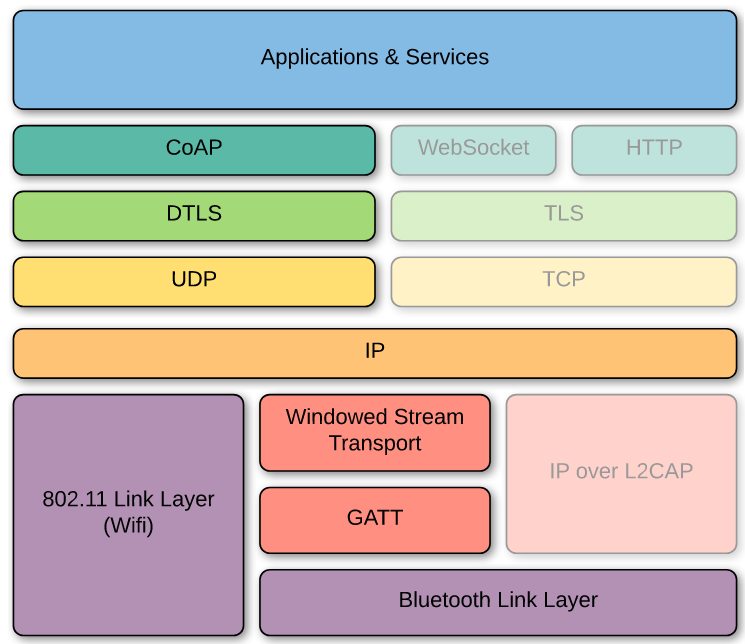 The Stack Diagram
CoAP
CoAP is an internet technology standard defined in RFC7252. It offers a request/response protocol very similar to HTTP, but with lower processing overhead and the ability to be transported over UDP instead of TCP. It has built-in support for reliability (even though UDP itself does not offer that), and well-defined semantics that are very close to what developers may be used to in HTTP, such as GET, PUT, POST, and DELETE methods, request and response headers (“options” in CoAP terminology), numeric response status codes that map 1:1 with HTTP response status codes, and more.
Getting started with CoAP
Before getting started and learning how the Fitbit app communicates with the Fitbit Charge 5, it is useful to get a feel for how CoAP works in practice and what it looks like. In the following sections, I will show how it is possible to set up a CoAP server, connect to it with a CoAP client, and inspect the communication between the two using Wireshark.
Instructions on how to get started with CoAP are out of scope for this post, but if you want to learn how, you can refer to the full report.
Before diving into how Fitbit leverages CoAP within their Golden Gate framework, it helps to understand how the protocol operates in the context of an Android application.
Building and modifying the sample Android Application
In the Golden Gate repository, they provide a sample Android application. The app is located at golden-gate/platform/android/goldengate/. The app defines a resource handler for a GATT server, which is the piece of code responsible for handling GET requests received on the main endpoint. Generic Attribute Profile (GATT) is a general specification for sending and receiving short pieces of data known as “attributes” over a BLE link. All current BLE application profiles are based on GATT. In GATT, once a connection is established, one device acts as the server and the other as the client. The device in the client role sends requests for data, and the device in the server role fulfills them.
I modified the default HelloWorld resource handler to return a custom message instead of “Hello world!” /handler/HelloWorldResourceHandler.kt.
1
2
3
4
5
6
7
8
9
10
11
12
13
14
15
// [...]

/**
 * Coap resource handler that will return "Hello Ivan!"
 */
class HelloWorldResourceHandler : BaseResourceHandler() {
    override fun onGet(request: IncomingRequest, responseBuilder: OutgoingResponseBuilder): Single<OutgoingResponse> {
        return Single.just(helloWordResponse(responseBuilder))
    }
    private fun helloWordResponse(responseBuilder: OutgoingResponseBuilder) =
            responseBuilder
                    .option(ContentFormatOption(FormatOptionValue.TEXT_PLAIN))
                    .body("Hello Ivan!".toByteArray())
                    .build()
}
Once the app is recompiled and running, you can install it on two devices and let them talk via CoAP. When sending a message, you will see something similar to:
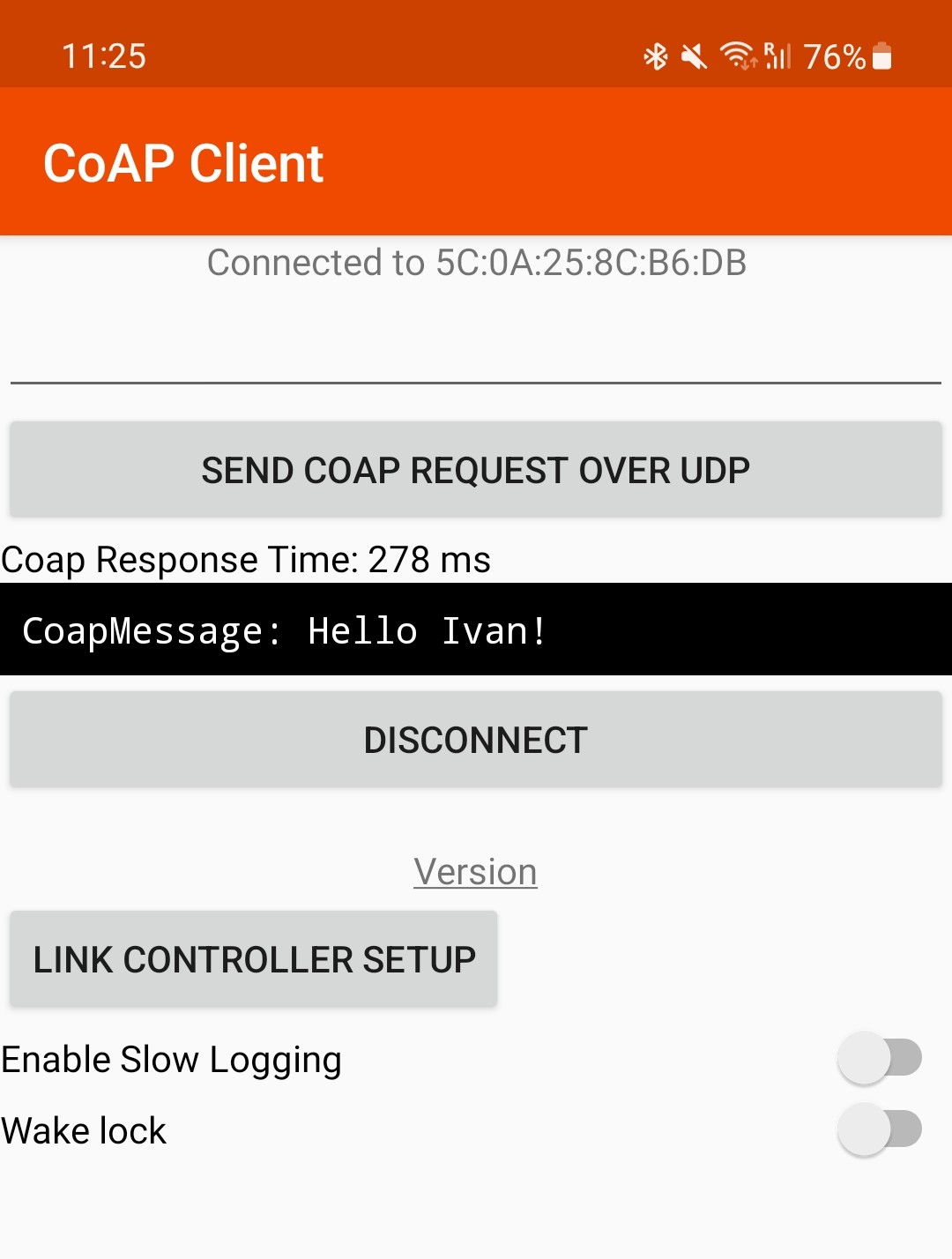 The modified Golden Gate App
CoAP interception over BLE in Wireshark
I won’t go into the details of how to capture BLE traffic in Wireshark, but while the app is running, this is the BLE traffic sent during a simple GET request:
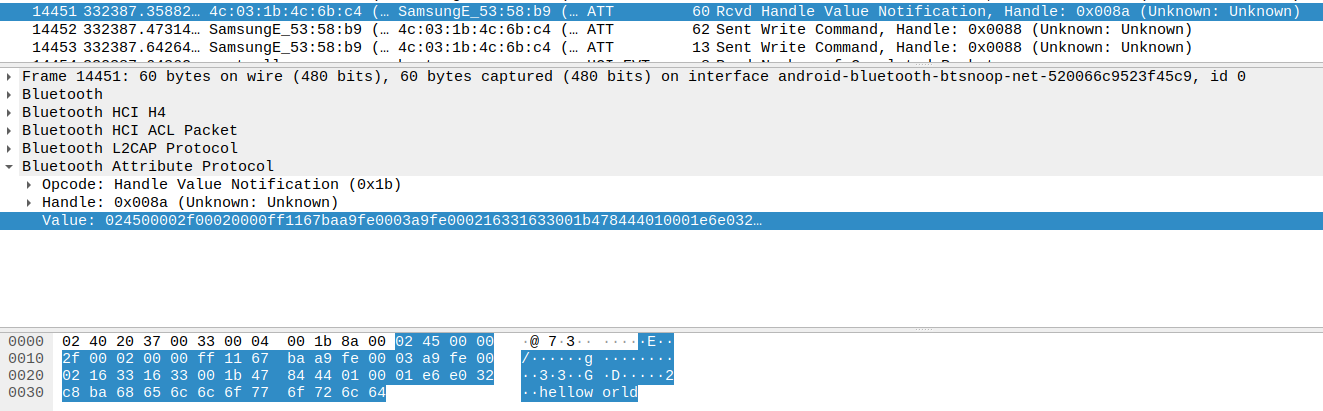 The request to GET /helloworld
The traffic can be seen in clear text. The Golden Gate app offers the ability to use a stack configuration with encryption thanks to TLS. Of course, if you use that stack configuration, Wireshark will only show encrypted data, as Wireshark operates at the network layer.
Encryption is one of the key features of Golden Gate. It is needed because, as explained in the Android BLE Guide:
When a user pairs their device with another device using BLE, the data communicated between the two devices is accessible to all apps on the user’s device. For this reason, if your app captures sensitive data, you should implement app-layer security to protect the privacy of that data.
As you might expect, real-world apps will have encryption enabled, and communication over BLE will always happen through TLS. For this reason, an MITM attacker will only ever see encrypted blobs over the network, as TLS is designed to be secure even in MITM scenarios. To get around this limitation, we will have to intercept the traffic at the application layer (where the traffic must be decrypted to be used by the application). To do so, all you need is a rooted device and Frida.
Introduction to Frida
Frida is a:
Dynamic instrumentation toolkit for developers, reverse engineers, and security researchers.
In other words, it allows you to inspect an application at runtime (think of it like gdb). It allows you to write JavaScript hooks for the functions of the application. Whenever a function that you hook is executed in the app, the control flow of the application is redirected to your code. This allows you to execute code in the context of the application; for example:
- Change the return value of a function
- Print the arguments of a function
- Call another function
Instructions on how to install and get started with Frida are out of scope for this post, but all you need to know is that at the time I was using Frida 16.1.10 and the Frida agent.
So you want to hook a function
Well, when you use the app and send a message between the two devices, your custom message is shown. How about hooking that function and printing a message every time it is called? In Frida, that hook will look something like:
1
2
3
4
5
6
7
8
9
10
Java.perform(function() {
    var HelloWorldResourceHandler = Java.use('com.fitbit.goldengatehost.coap.handler.HelloWorldResourceHandler');

    HelloWorldResourceHandler.onGet.implementation = function (request: any, responseBuilder: any) {
        const time: number = Date.now();
        console.log(` ${time}  onGet method hooked`);
        let retval = this.onGet(request, responseBuilder);
        return retval;
    };
});
If the application is running and Frida is also running, you should see a log appear in the Frida console: 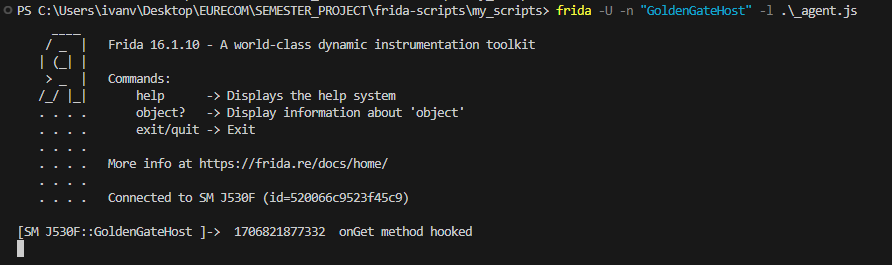 Hooking the onGet method of the HelloWorld class
Hooking Bluetooth
We are trying to understand the communication between two devices that communicate over Bluetooth LE. So it would be nice to be able to monitor the BLE communication. By itself, hooking Bluetooth is not too useful, because we only see encrypted bytes being exchanged. But we will use this information in another way: if we see a spike in the data being exchanged on the Bluetooth channel, we might be able to correlate it with something happening on the watch, for example the beginning of an activity.
Frida hooks for intercepting Bluetooth communication were already available in frida/blemon.js, but you can find the minor changes of my version in my repository.
In the next section I will detail how I discovered the functions responsible for parsing these messages.
Hooking Golden Gate
The device we are hooking is able to both send and receive requests. For each request sent, the device might expect to see a response. Additionally, for each request received, we expect the device to answer back with a message.
Because Golden Gate is a client-server protocol, we might expect to find different functions, such as one for the client to send a request to the server and one to handle the responses received from the server. Likewise, on the server side, there will be a function for handling incoming requests and another one for sending out responses.
To map out Golden Gate specifically, I hooked key framework classes:
- Server side: hooking the
invokemethod of thecom.fitbit.goldengate.bindings.coap.handler.ResourceHandlerInvokerclass, allowed me to inspect incoming requests and outgoing responses. - Client side: hooking the
responseFormethod of the classcom.fitbit.goldengate.bindings.coap.CoapEndpointand the methodcreateIncomingResponseof the classcom.fitbit.goldengate.bindings.coap.block.BlockwiseCoapResponseListener, which handle, respectively, sending requests and receiving responses.
With these hooks, we can understand each message sent and read the data being exchanged in clear text. All the hooks for the Golden Gate library are contained in the module golden_gate_lib.
Details and challenges with hooking the Golden Gate library
Investing time in writing Frida hooks for the sample Android application paid off immensely when investigating the Fitbit app.
While Fitbit is vastly more complex, it relies on the same underlying Golden Gate Java library. Because I had already refined my hooks on the sample app, implementing them in a heavily obfuscated and difficult-to-reverse environment like Fitbit was practically free in terms of extra effort.
This was a really valuable lesson for me: instead of going directly to hook the Fitbit app, which can be tempting, it’s better to start by writing tooling that can handle the simple cases first, and once we are confident, reuse the same tooling on the target app to handle all the edge cases it might have.
A detailed breakdown of the specific implementation differences between the sample app and the Fitbit app is outside the scope of this blog post; interested readers can find the complete analysis in the full technical report.
Hooking the Fitbit app
In the context of the Fitbit app, it is useful to think of the Fitbit app as the client and the watch as the server. With the hooks created for the Golden Gate library, we can immediately see many messages exchanged. Unlike in the example application, the data exchanged is encoded using CBOR (Concise Binary Object Representation) and protocol buffers.
Challenges with understanding how large apps work
When understanding a very large project, it can be tempting to just hook everything and see which functions are called. This might work for small apps and projects, but this is not often the case with larger projects such as the Fitbit app. It has thousands of classes and methods, and to be fair, we do not care about 99% of them. We care only about understanding the communication between the Fitbit device and the application, understanding what messages are exchanged, and understanding what triggered that message (e.g., the start of a fitness activity, a refresh in the application, pairing of a new device, …).
In the Hooking Golden Gate section, I explained how I built generic hooks for intercepting all messages sent over Bluetooth. Once you do that, you will immediately see that the app sends a GET request about every second to the Fitbit device with the path /liveactivity and that the watch answers back with some binary data. The next step is to understand the meaning of this binary data.
You can then write a hook for this endpoint and print out what the binary data contains. This is exactly what I did in the printLiveActivity() function. It turns out the endpoint returns information collected from the watch every second, such as step count and heart rate. You can see the full list in my notes.
Next, when you are satisfied with this step, go to the next endpoint, and then the next, until you can understand every message sent and every interaction. Again, the hooks written for the sample app really helped here by providing an overview of all the communication happening between the app and the Fitbit.
Modifying the return value of an endpoint
I created a hook that modifies the value returned by the /liveactivity endpoint so that the Fitbit app will show that we have walked 1337 steps, even though, when we look at the Charge 5, it still says that we have done a different number of steps. In other words, we are faking this information.
This is handled in the function editLiveActivity(). Basically, I hook the function parseFrom of the class com.fitbit.goldengate.protobuf.LiveActivity$Activity, which converts the protocol buffer into a Java object, and modify the return value of this function by calling setSteps(1337) on the returned object.
1
2
3
4
5
6
7
8
9
function editLiveActivity(){
    let Activity = Java.use("com.fitbit.goldengate.protobuf.LiveActivity$Activity");
    Activity["parseFrom"].overload('[B').implementation = function (data: any) {
        let result = this["parseFrom"](data);
        let modifiedActivity = Java.cast(result, Java.use("com.fitbit.goldengate.protobuf.LiveActivity$Activity"));
        modifiedActivity.setSteps(1337);
        return modifiedActivity;
    };
}
This is the result:
Modifying the response returned by the get to /liveactivity to show 1337 steps!
To find out what other endpoints the Fitbit app queries on the watch and learn what other data is exchanged, you can read the full technical report in the repo.
Conclusions and future work
In this article, I showcased how a Fitbit Charge 5 communicates with the Fitbit app and my process for reverse engineering the protocol of communication between the two.
In particular, I built tooling for intercepting and modifying all messages sent between the device and the app. In this research, I did not explore in depth how the Fitbit app communicates with the Google backend, although some preliminary research and notes are available in the full report.
It might have been worthwhile at the time to explore this aspect more, especially because communication with the backend happens when a new device is paired, and it could be interesting to research potential vulnerabilities in that communication.
During the limited time of the research, I was not able to spot any inconsistency that might have led to a vulnerability in the communication between the Fitbit app and the watch, but I still felt very satisfied with the tools I built, which might enable someone in the future to discover such vulnerabilities.